
Build PHP Pivot Tables for MYSQL with Drag-and-Drop in SRM 10.0
We’re thrilled to announce that Smart Report Maker 10.0.0 is launching this month — and it comes with a powerful new PHP Pivot Tables module!
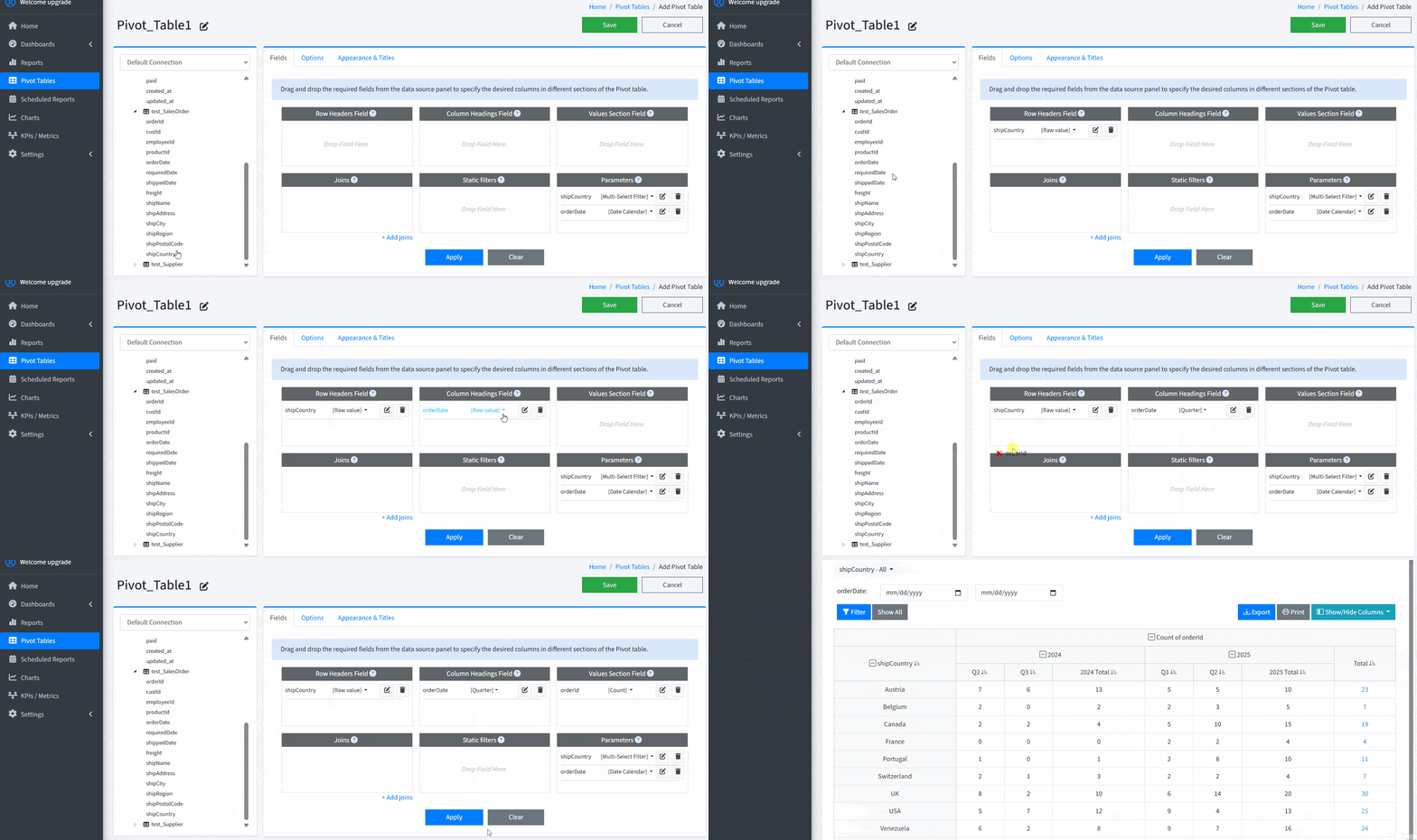
Effortlessly create PHP pivot tables from MySQL (and other databases) in minutes using our intuitive drag-and-drop editor — no coding required.
Try PHP Pivot Table Drag-and-Drop Editor
Why Use PHP Pivot Tables?
Building pivot tables in PHP usually means complex SQL queries, GROUP BY logic, and extra frontend work.
Smart Report Maker removes that complexity and lets you create interactive pivot tables visually.
- Summarize large MySQL datasets visually.
- Uses an easy to use Drag and Drop editor.
- Apply filters and parameters interactively.
- Share pivot reports securely with users.
- Embed pivot tables into PHP dashboards.
Features of the PHP Pivot Tables Editor in SRM 10.0.0
- Drag-and-Drop Interface
Easily assign fields to the “Rows,” “Columns,” and “Values” sections using a powerful drag-and-drop editor —
perfect for building visual pivot tables without coding. - Automatic Relationship Detection
When working with data from multiple tables, SRM intelligently detects table relationships.
You can also manually adjust them if needed. - Static Filters for Precision
Define fixed filters so only the exact records you need are included in your pivot reports. - Dynamic Filtering with Parameters
Define interactive parameters that allow end-users to filter pivot tables on the fly,
creating personalized views of the data. - Intuitive Parameter Display for End Users
Parameters can be shown in user-friendly formats — including
calendar date pickers, time sliders, multi-select dropdowns, numeric range sliders, and search boxes —
making filtering simple and interactive. - Smart Date Handling
Group date fields by year, quarter, month, weekday, time, or full date to create summarized views. - Subtotals for Periodic Summaries
Display subtotals within grouped periods for better insight. - Grand Total Visibility Control
Toggle the display of grand totals for both rows and columns. - Customizable Styles and Templates
Customize with titles, numeric formats, currencies, and custom units. - Access Control: Public or Group-Based
Make pivot tables public or restrict them to specific user groups. - Flexible Aggregation Functions
Support for Sum, Count, Count Distinct, Average, Min, Max, and First Value. - Export Capabilities
Export pivot tables to multiple formats for sharing or offline use. - Column Visibility Management
Hide or show specific columns to simplify the view. - Dashboard Integration
Embed pivot tables into dashboards with reports and KPIs. - User-Friendly and Performance-Optimized
Built for speed and usability — even large datasets load quickly.
Frequently Asked Questions (FAQ)
Q: Can I create PHP MySQL pivot tables in Smart Report Maker without writing SQL?
A: Yes. Smart Report Maker allows you to build powerful PHP MySQL pivot tables using a drag-and-drop editor, without writing a single line of SQL.
Q: What are PHP pivot tables?
A: PHP pivot tables are dynamic tables generated in a PHP application that summarize and reorganize database data by turning rows into columns and applying aggregations.
Q: Which databases are supported for PHP pivot tables in Smart Report Maker?
A: Smart Report Maker supports MySQL, MariaDB, PostgreSQL, SQL Server, Oracle, and other major databases.
Q: Can end users filter pivot tables dynamically?
A: Yes. You can add interactive parameters so users can filter pivot tables by date, category, numeric ranges, or custom values.
Q: Can I embed pivot tables into dashboards?
A: Absolutely. You can embed PHP pivot tables into SRM dashboards and combine them with charts, KPIs, and reports.
Summary
Smart Report Maker 10.0.0 introduces a powerful new module for building PHP pivot tables
(including MySQL pivot tables) with an intuitive drag-and-drop editor.
Analyze and summarize data, apply filters, define parameters, and customize layouts — all without writing SQL or PHP code.