
Smart Report Maker 11.0 Release: Powerful New Features You’ll Love
Smart Report Maker 11.0 has officially arrived, and it’s a major release packed with powerful enhancements. This version introduces a new WordPress plugin that lets you embed reports, charts, dashboards, pivot tables, and metrics directly into your website, along with an Embed Manager designed for integrating analytics into PHP-based applications. It also adds support for linked reports, allowing you to build report chains by passing parameters between reports. In addition, you can now include barcodes and maps in your reports, take advantage of many new layout options, duplicate existing reports with ease, and explore a range of other improvements that make reporting more flexible, insightful, and efficient.
Benefits the New Version Brings to Your Business
- Embed dashboards and reports directly into your PHP applications.
- Add your reports and analytics to WordPress pages using the new plugin.
- Link related reports to form report chains, enabling you to explore connected data and gain deeper insights.
- Save time with duplicate-report and column-reordering tools.
- Present data more effectively with new layouts, barcodes, and map visuals.
Smart Report Maker 11.0 Highlights
WordPress Plugin
Smart Report Maker 11.0 introduces a new WordPress plugin that lets you embed reports, charts, dashboards, pivot tables, and metrics directly into your WordPress website with ease. For more click here
Embed Manager for PHP Applications
The new Embed Manager allows you to integrate both public and private resources into your PHP applications. Just specify the resource, generate an access key, download a single PHP script, customize if needed, and add it to your product. For more click here
Linked Reports (Report Chains)
Reports are no longer isolated. You can now link them together by passing parameters and building report chains — even long ones — to uncover deeper insights.For more click here
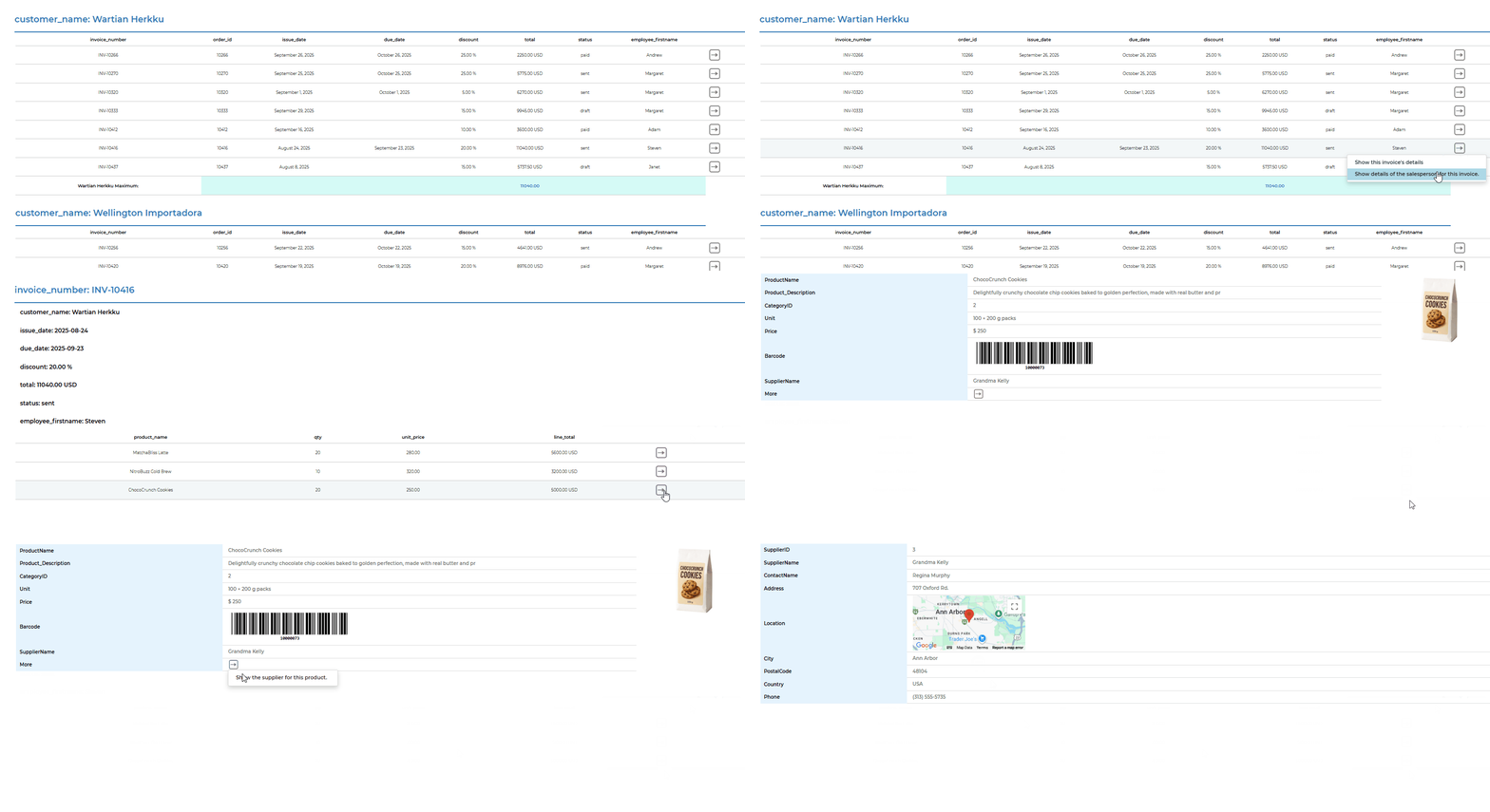
Linked reports built with Smart Report Maker
Barcodes & Maps in Reports
Version 11 adds support for barcodes and map visuals inside your reports, enabling more interactive and data-rich output for logistics, locations, and tracking.
New Report Layouts
A variety of new layout options give you more control over the structure, organization, and presentation of your reports.
Duplicate Reports
Quickly duplicate existing reports to create new versions without starting from scratch, saving time and effort.
And More Enhancements
Smart Report Maker 11.0 includes many additional improvements that make reporting faster, easier, and more powerful overall.
See Some of the New Features in Action
Here’s a practical example that showcases several of the new features introduced in version 11. It includes linked reports using the new layouts and barcodes, and it’s embedded through the WordPress plugin to demonstrate how these enhancements can work together in real usage.
Embedded Linked Invoices per Customer Report in WordPress
Users can now navigate seamlessly from an “Invoices per Customer” report to the invoice details, then to the products within each invoice, and even to the supplier of each product. This example showcases how Linked Reports, some of the the new Layouts and Barcodes, and the WordPress Embed Plugin work together to create a smooth and practical reporting experience in real use. Click here to view example.
Embedded Sales Dashboard in WordPress
A demo dashboard embedded in a WordPress page. It includes multiple charts, metrics, a pivot table, and reports—all generated using Smart Report Maker. Click here to view example.
Embedded Product Catalog in WordPress
A demo Product Catalog linked report that allows you to view products and then navigate to the invoices for each product, grouped by customer, and finally to the Assigned Sales Employee for each invoice. The reports were created using Smart Report Maker, and the embedding was done through the WordPress plugin. Click here to view example.
Explore our video guides for each of the new features.
We’ve prepared a detailed video tutorial for each new feature, so you can see them in action and understand how they can benefit your business. Click here to view our video tours.