
Top 5 Tools to Create MySQL Pivot Tables Easily
A pivot table is a powerful data summarization tool that allows you to reorganize, group, and aggregate large amounts of data into a concise, easy-to-read format. Instead of scanning thousands of rows in raw tables, a pivot table lets you transform rows into columns, apply calculations such as totals and averages, and instantly uncover patterns, trends, and comparisons.
Pivot tables are widely used in business intelligence and data analysis because they turn complex datasets into meaningful insights that support better decision-making.
Why Pivot Tables Are Essential for Data Analysis
Pivot tables provide several important benefits for analysts, developers, and business users alike:
-
Fast data summarization – Aggregate large datasets in seconds.
-
Flexible analysis – Rearrange rows, columns, and values without rewriting queries.
-
Better visibility of trends – Easily spot patterns, outliers, and correlations.
-
Improved reporting – Present clean, structured summaries for stakeholders.
-
Reduced manual work – Eliminate repetitive calculations and spreadsheet formulas.
-
Supports multiple metrics – Apply sums, counts, averages, percentages, and more.
No-Code MySQL Pivot Tables
Traditionally, creating pivot tables in MySQL requires writing complex SQL using CASE statements or dynamic queries. While powerful, this approach can be time-consuming and intimidating—especially for non-technical users.
That’s why many teams now rely on no-code tools that generate MySQL pivot tables visually, without writing SQL.
In this article, we’ll share our top 5 tools for creating MySQL pivot tables without coding, helping you build powerful summaries quickly and effortlessly.
1. Smart Report Maker
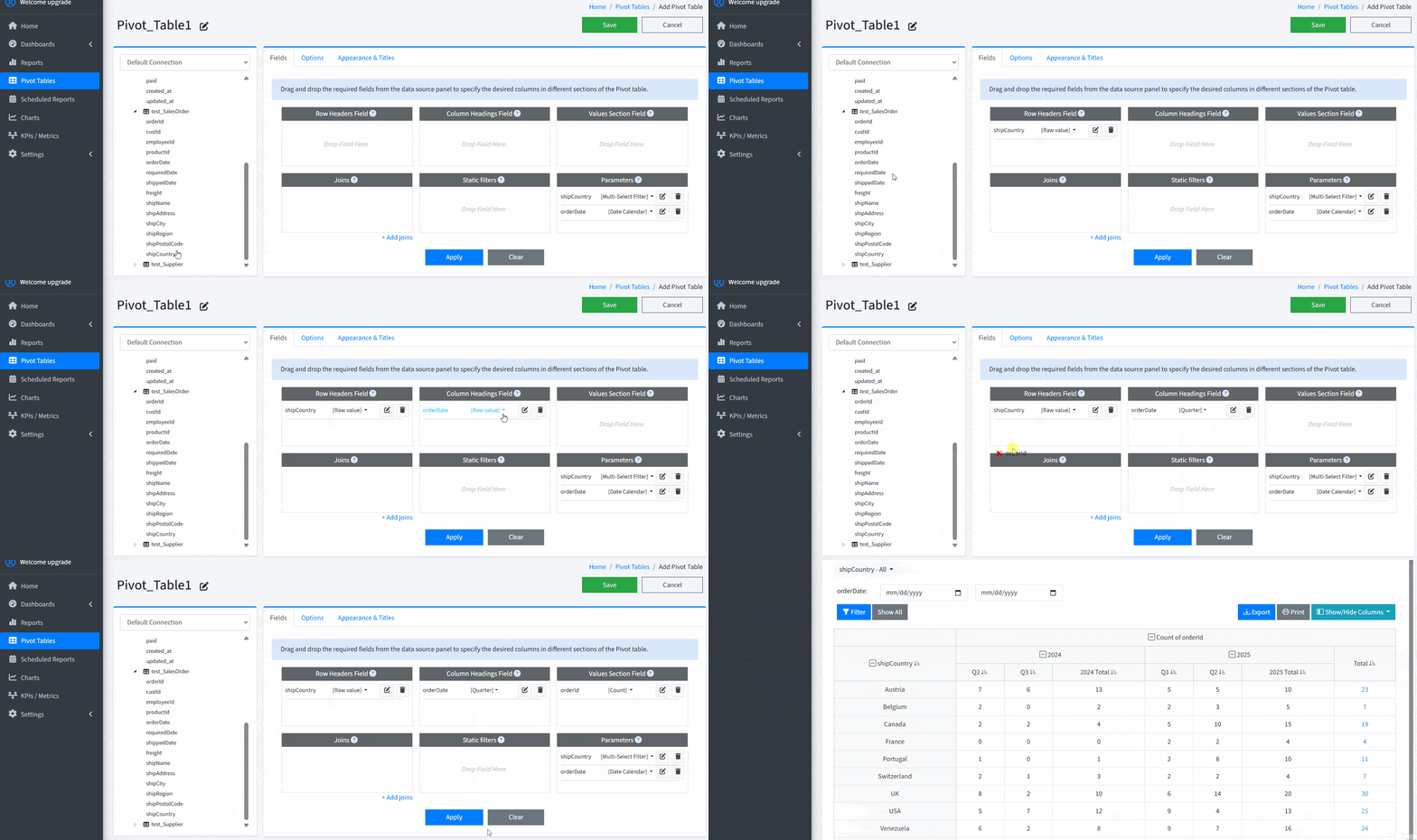
Smart Report Maker is a professional PHP & MySQL reporting tool that allows you to design pivot tables visually with a drag-and-drop editor and embed them seamlessly into your PHP applications or websites. It is built for teams that want powerful reporting, interactivity, and full control—without writing SQL or custom code.
Benefits of Smart Report Maker
-
Drag-and-drop pivot table editor – Build complex pivot tables by simply selecting rows, columns, and measures using a visual interface, with no SQL or formulas required.
-
End-user parameters & filters – Define input parameters (dates, categories, ranges, etc.) so users can dynamically filter and refresh pivot tables on demand.
-
Embed pivot tables as dashboard widgets – Add pivot tables directly into interactive dashboards alongside charts, KPIs, and other reports.
-
Secure and easy embedding – Embed pivot tables inside your own application, internal portal, or WordPress site using secure authentication and access control.
-
Designed for MySQL & MariaDB – Optimized specifically for MySQL-based data sources, ensuring fast performance and reliable results.
-
Export & sharing options – Allow users to export pivot tables to Excel, PDF, or print-friendly formats.
-
Easy installation on shared hosting, VPS, or dedicated servers across both Linux and Windows environments.
This makes Smart Report Maker a strong choice for companies that need embedded analytics, interactive reporting, and flexible pivot tables inside their own products or websites.
2. dbForge Studio for MySQL
dbForge Studio for MySQL is a high-end IDE for MySQL and MariaDB, a comprehensive solution designed to make nearly every aspect of work with your databases quick and effortless. With its clean and intuitive GUI, the Studio proved to be a perfect fit for beginners and seasoned pros alike — and the wealth of its features covers the following tasks with ease and precision.
-
Full-featured GUI includes an interactive pivot table view.
-
Rearrange fields and apply aggregations via drag-and-drop.
-
Grouping, filtering, and sorting options built in.
-
Export pivot data to external formats.
-
Great for developers who want both IDE and pivot capabilities.
3. Ubiq Analytics
Ubiq is an embedded analytics platform that helps teams add interactive reports, dashboards, and pivot tables directly into their applications. It focuses on no-code analytics and secure embedding, making it ideal for SaaS products and internal business tools.
-
No-code pivot table builder – Create pivot tables visually using a drag-and-drop interface, without writing SQL.
-
Direct MySQL connectivity – Connect to your MySQL database and work with live data.
-
Interactive filtering and grouping – End users can slice, group, and aggregate data dynamically.
-
Embedded analytics – Seamlessly embed pivot tables into your web app, SaaS platform, or internal system.
-
Secure access control – Manage user permissions and control who can view or interact with each pivot table.
-
Export and sharing options – Download pivot tables to Excel or share insights with other users.
4. Smart Pivot Table – An Open-Source MYSQL Pivot Table Builder
Transform your MySQL data into insightful pivot tables with Smart Pivot Table—a completely free PHP tool that eliminates the need for coding. Its intuitive visual interface allows you to connect your database and define data sources instantly, making complex data analysis accessible to everyone.
-
Free open-source pivot table generator for MySQL.
-
Simple UI for creating pivot tables without writing SQL.
-
Self-hosted and customizable to your needs.
-
Good for teams on a budget or internal tools.
-
Easy to integrate into workflows with code access.
5. SeekTable
SeekTable is a self-service BI tool for data exploration, operational & embedded reporting with live pivot tables & charts
-
Self-service BI tool with live pivot tables and charts built straight from your MySQL database.
-
Drag-and-drop report builder designed for non-technical users.
-
Supports dynamic measures and grouping without writing SQL.
-
Export pivot table results to Excel, CSV, or PDF.
-
Can be used as an embedded analytics engine in your applications
Final Thoughts
Creating MySQL pivot tables manually using SQL is certainly possible, but it often involves complex CASE statements and dynamic queries—especially as your data structure and reporting needs grow. The more complex the pivot table becomes, the more difficult and time-consuming it is to write, debug, and maintain those queries.
That’s where no-code pivot table tools offer a major advantage. Instead of writing SQL, you can build pivot tables visually by selecting rows, columns, and measures, saving both time and effort.
When choosing a tool, consider the level of complexity you need:
-
A simple tool may be enough for basic summaries.
-
A more advanced tool may be better if you need parameters, dashboards, or advanced calculations.
Also think about your deployment preference—whether you want a tool you install on your own server or a SaaS solution hosted in the cloud.
Finally, decide how you plan to use the pivot tables:
-
Do you need to embed them inside your application or website?
-
Or is it enough to view and analyze them within the BI tool itself?
By answering these questions, you’ll be able to choose the right no-code tool that fits your workflow, technical environment, and business goals—while avoiding the complexity of manual SQL pivot queries.