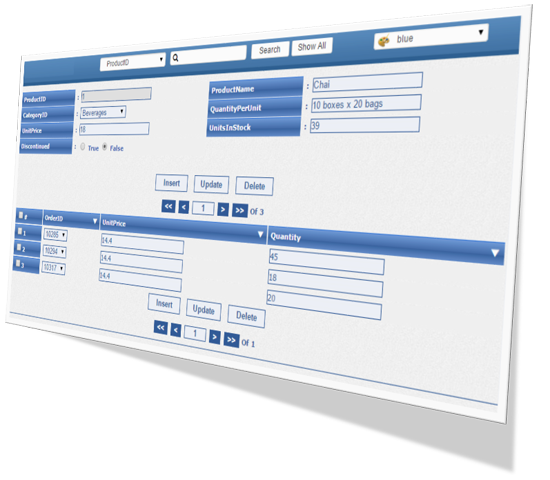
Easy-to-Use PHP Form Builder for MySQL and MariaDB
Smart Form Maker is a powerful yet easy-to-use
PHP Form Builder that lets you create dynamic
PHP Forms to manage records in your
MySQL and
MariaDB databases with just a few mouse clicks.
It is a complete
PHP MySQL Form Builder designed to generate AJAX-based
MySQL Forms without writing PHP, SQL, or JavaScript code.
Smart Form Maker can be used to generate multiple types of
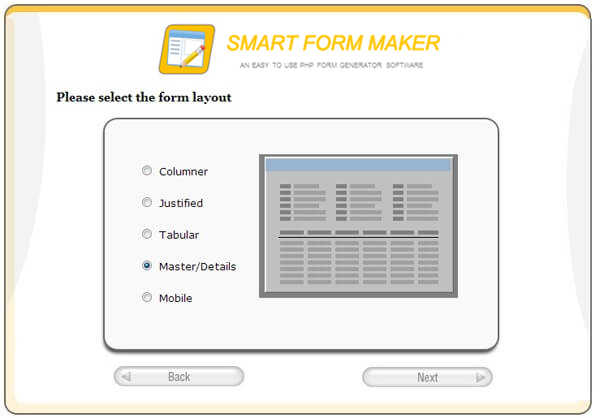
PHP MySQL Forms, including columnar forms, master-detail forms (also known as sub-forms), editable grids for bulk data processing, mobile-friendly forms, and more.
Main Features of Smart Form Maker:
- Easy-to-use wizard-style interface.
- Generate and manage an unlimited number of dynamic PHP Forms from your MySQL database.
- Extensive form types:
- Columnar forms (standard PHP Forms).
- Editable grids to process multiple records at once.
- Justified forms.
- Mobile-friendly forms.
- Master-detail forms (sub-forms).

- Use generated PHP Forms to insert, update, search, navigate, and delete records from your MySQL database.
- Ability to send email notifications.
- Generate multi-style MySQL Forms.
- Security option to password-protect any form.
- Automatic validation rules based on column data types.
- Mobile-friendly PHP Forms.
-
AJAX-based technology that submits form data without refreshing the page.
-
Database columns are automatically rendered into form elements.
For example, DATE fields become calendar inputs, and ENUM fields become drop-down lists.
- Advanced customization options.
- Data filters.
- Friendly field labels using aliases instead of raw SQL column names.
- Easy handling of foreign keys.
- Editable grids for bulk record processing.
- Custom error messages.
- Multiple built-in themes.
- Custom headers and footers.
- One license allows installation on up to five domains.
- No setup hassles.
- Free support.
Tutorials:
System Requirements of Smart Form Maker:
- Any web server
- PHP version 5 or higher
- Any version of MySQL or MariaDB
Frequently Asked Questions (FAQ)
Q: Is Smart Form Maker easy to install?
A: Yes. Smart Form Maker is a pure PHP application. You simply upload it to your server and start using it immediately. No command-line usage, no complex setup, and no server configuration are required.
Q: Do I need programming skills to install or use Smart Form Maker?
A: No. Smart Form Maker is designed for both technical and non-technical users. You can build PHP Forms through a wizard-based interface without writing PHP, SQL, or JavaScript code.
Q: Does Smart Form Maker support both MySQL and MariaDB databases?
A: Yes. Smart Form Maker is a PHP MySQL Form Builder that supports both MySQL and MariaDB, allowing you to generate dynamic MySQL Forms from your existing databases.
Q: Can I create master-detail (sub-form) forms using Smart Form Maker?
A: Yes. Smart Form Maker supports master-detail forms, allowing you to manage data from two related tables on the same page. For example, you can manage customers and their orders in a single PHP Form.
You can also follow
this step-by-step tutorial to learn how to build master-detail forms.
Q: What types of forms can I create, and do they support AJAX submission?
A: You can create columnar forms, editable grids, mobile forms, justified forms, and master-detail forms. All generated PHP Forms use AJAX submission for a smooth user experience.
Q: Is there a promotion if I purchase Smart Report Maker? Can I get a discount on Smart Form Maker?
A: Yes. There is usually a cross-product promotion between Smart Report Maker (SRM) and Smart Form Maker (SFM). The discount is typically around 25%, but it may change over time. Check the checkout page for current offers.
Try Demo Version
Docs