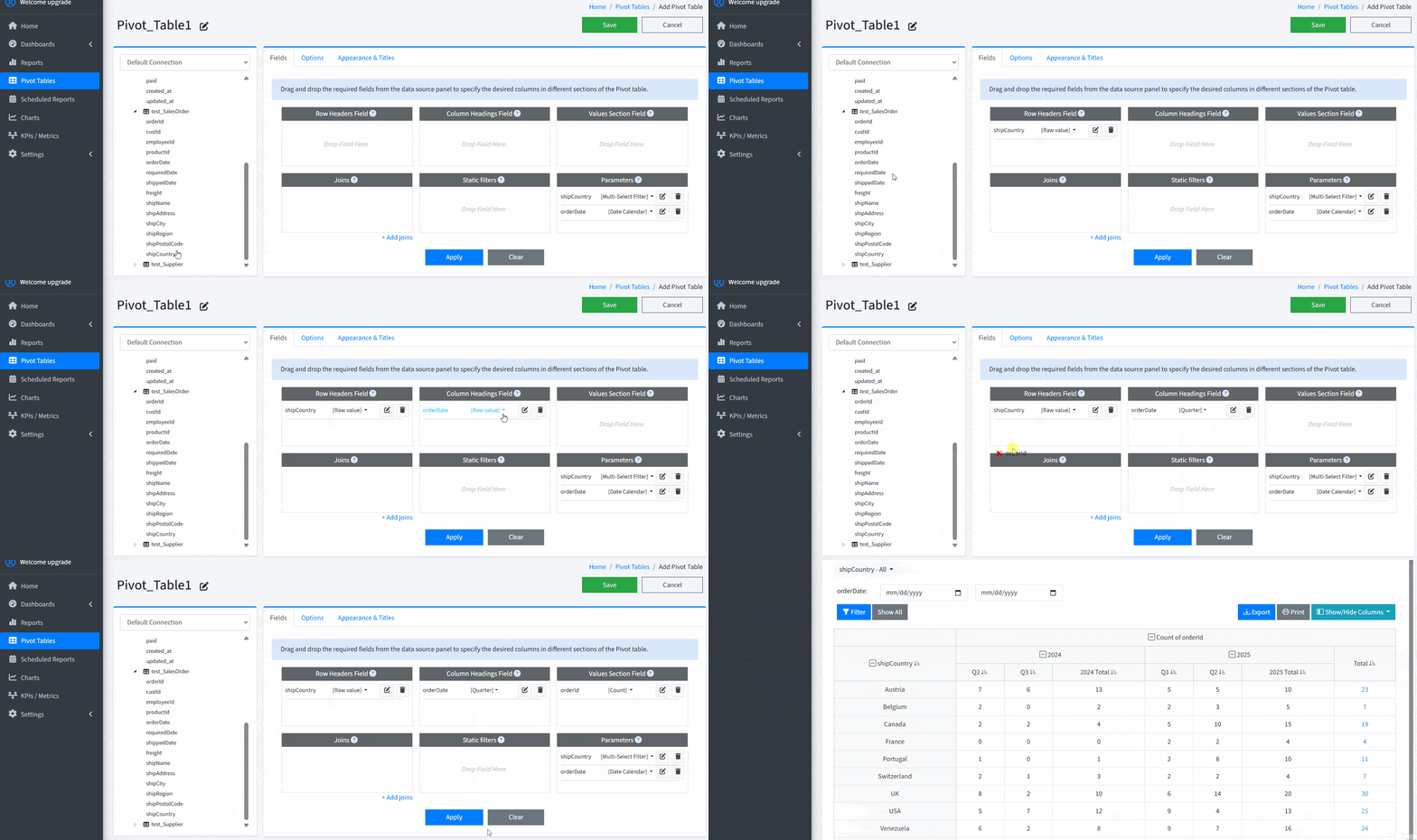
Smart Report Maker includes a powerful module for creating MySQL and MariaDB pivot tables using an incredibly easy-to-use drag-and-drop editor. This module is designed to save you time and effort while giving you full flexibility. Whether you need to summarize sales data, analyze user activity, or break down performance by category, the pivot table builder helps you do it all — without writing a single line of SQL.
The following examples showcase pivot tables generated by Smart Report Maker from existing MySQL databases across a variety of business industries.

These pivot tables summarize quarterly sales and sales by weekday, helping identify sales trends and performance with flexible filtering.

This pivot table is generated from a demo Clothing Store database and summarizes current stock by product and size. It can be filtered by color, material, and price for deeper analysis. Like all Smart Report Maker resources, the default SRM logo can be replaced with your own company logo.

This pivot table is generated from a demo Pet Clinic database and summarizes vaccination records for all pets. It enables users to quickly review vaccine doses, identify missing vaccinations, and determine which vaccines each pet still requires.
Create pivot tables by simply dragging database fields into Rows, Columns, and Values sections. No SQL required — just point, drag, and drop to generate complex cross tabulations that provide instant insights from your MySQL or MariaDB data.
Enable yearly subtotals and grand totals to see not only the performance of each period, but also the total per year and the overall total at a glance. Choose whether to display grand totals for rows, columns, or both — showing just the right level of detail.
Define interactive parameters that let end users change filters on the fly using calendar date pickers, multi-select dropdowns, range sliders, and search boxes. This turns a static pivot table into a powerful exploration tool for your MySQL database.
When working with multiple tables, SRM automatically detects relationships between them based on foreign keys. You can also manually adjust relationships if needed, giving you full control over how your data is joined and displayed.
Apply fixed filters using the same drag-and-drop interface to limit the data shown in your pivot table. Focus on specific timeframes, categories, or customer segments to keep your PHP MySQL pivot table clean, relevant, and accurate.
Group date fields by year, quarter, month, weekday, or time to generate time-based reports such as annual trends, quarterly comparisons, or weekday performance breakdowns — a vital feature for time-series cross tabulation in MySQL.
SRM supports a wide array of aggregation functions including Sum, Count, Count Distinct, Average, Minimum, Maximum, and First Value. These enable advanced MySQL cross tabulation and flexible business analysis — all in a visual, code-free environment.
Choose from professionally designed templates and customize them to fit your brand. Change table titles, number formats, currencies, and units of measurement to ensure consistency across your reporting environment.
Hide or show specific columns as needed to simplify your view or highlight key metrics. This is especially useful when dealing with large pivot tables where not all data is always relevant to every audience.
Export your pivot tables in different formats so you can share them with colleagues, include them in presentations, or archive them offline. Sharing insights across your organization has never been easier.
Pivot tables can be made public or restricted to specific user groups. This access control feature is ideal for sharing insights securely across teams or departments while maintaining data privacy.
Embed your pivot tables directly into SRM dashboards alongside other reports and KPIs. This provides a centralized view of your business metrics, updated in real-time with high performance and usability.
Quick Guide: Build Pivot Tables via Drag-and-Drop in Smart Report Maker
A: Yes. Smart Report Maker allows you to build powerful MySQL and MariaDB pivot tables using a drag-and-drop editor, without writing a single line of SQL. You simply select fields and assign them to rows, columns, and values to generate insights instantly.
A: The pivot table builder uses an intuitive drag-and-drop interface where you move database fields into Rows, Columns, and Values areas. Smart Report Maker automatically handles grouping, aggregation, and calculations, making it easy to create complex pivot tables visually.
A: Yes. Smart Report Maker allows you to group Date and DateTime fields into years, quarters, months, weekdays, days, or hours. This makes it easy to create summary reports such as sales per month, quarterly performance, weekday trends, or hourly breakdowns.
A: Yes. When working with multiple tables, Smart Report Maker automatically detects relationships based on foreign keys. You can also manually adjust or define relationships to control how data is joined in pivot tables.
A: Smart Report Maker supports two types of filters when building pivot tables. Static filters are defined by you at design time and apply fixed conditions to the data. Dynamic filters (parameters) are defined by end users at runtime, allowing them to filter data interactively. Parameters can appear as text boxes, date pickers, time sliders, multi-select dropdowns, and other input controls. Both filter types are created using the same drag-and-drop editor, with many supported filter options and display styles.
A: Yes. You can define interactive parameters that allow end users to filter pivot table data dynamically using dropdowns, date pickers, sliders, or other input controls, enabling flexible, real-time analysis.
A: Yes. Smart Report Maker allows you to hide or show columns, reorder fields, and adjust layouts to simplify large pivot tables and highlight only the most relevant metrics.
A: Yes. Smart Report Maker allows you to embed PHP MySQL pivot tables securely into your own PHP applications. Embedded pivot tables remain fully interactive and support filtering and drill-down.
A: Yes. You can customize pivot tables by selecting from built-in themes, changing titles, hiding or showing columns, adjusting text alignment, formatting values, and choosing whether to display subtotals or grand totals.
A: You can try the Pivot Table Builder directly in the online demo version of Smart Report Maker. You can also watch this video tutorial to see the feature in action.
Building PHP MySQL pivot tables is easier and more powerful than ever. Whether you are visualizing sales trends, analyzing support tickets, or summarizing operational KPIs, the pivot table module empowers you to turn raw data into meaningful insights. It is the perfect solution for creating dynamic, interactive pivot tables for MySQL — all with drag-and-drop simplicity.