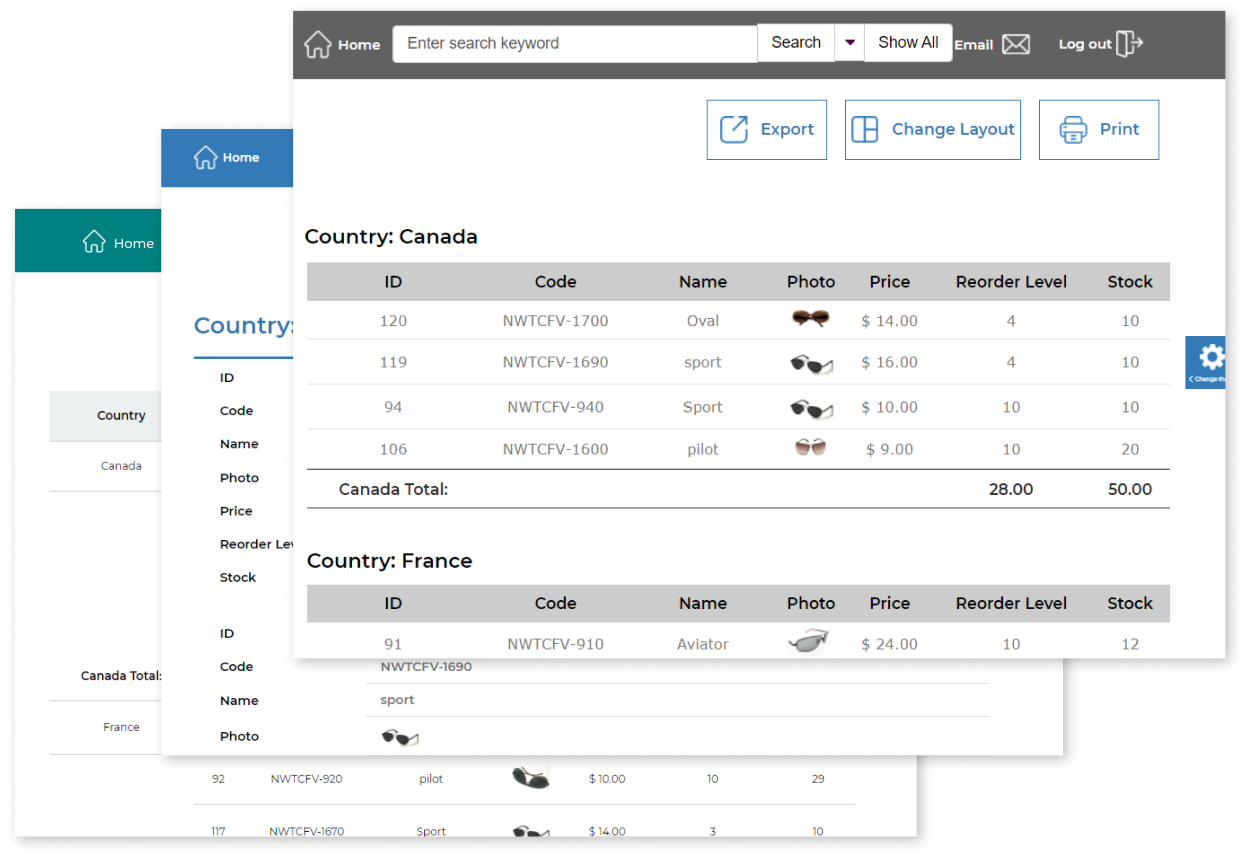
Easy-to-Use PHP Reporting Tool Trusted by Thousands of Businesses Across the United States and Worldwide
Smart Report Maker is a powerful MySQL and MariaDB report builder for generating PHP reports directly from your databases, trusted by businesses across the United States and worldwide. Its intuitive wizard-style interface makes report creation simple and accessible.
Easily Create PHP Reports from Your MySQL and MariaDB Databases with a User-Friendly Wizard Interface
Smart Report Maker (SRM) is designed with simplicity in mind, making it incredibly easy for anyone to create and edit reports without needing any programming skills. Thanks to its intuitive, wizard-style interface, users are guided step-by-step through the entire process—from selecting a database to customizing report layouts. There’s no technical complexity or steep learning curve—just a smooth, user-friendly experience that saves time and effort while delivering professional results.
Support for Multiple Data Connections
Smart Report Maker, as a powerful PHP Report Builder, supports connecting to multiple MySQL and MariaDB databases simultaneously, enabling users to streamline their reporting process. By combining data from various sources, it allows the generation of comprehensive and insightful reports that provide a unified view of critical information across different databases.
Create PHP Reports from Any Data Source
Smart Report Maker allows you to create PHP reports using a variety of data sources, including a single table, multiple related tables with join relationships, and custom SQL queries for more advanced and tailored data customizations.
Subtotals, Grand Totals, and Dynamic Calculations for Deeper Insights
Smart Report Maker empowers users to enhance their reports with dynamic calculated columns, subtotals, and grand totals. Calculated columns allow you to generate new insights by deriving values from existing fields—for example, calculating total revenue by multiplying unit price by quantity sold. Subtotals provide summaries within grouped data, such as showing the total sales per region or department. Grand totals give an overall summary across the entire dataset. These powerful features ensure that SRM delivers comprehensive, analysis-ready reports tailored to your specific needs.
Advanced Data Filters in the MySQL Reporting Tool
Smart Report Maker offers a comprehensive set of filtering tools to help you tailor reports precisely to your needs:
Advanced Column Filtering Easily apply advanced filters to any column in your report’s data source. This allows you to refine and customize the displayed information, making it easier to focus on what matters most.
Dynamic Filters for Runtime Flexibility Create dynamic, user-defined filters that can be set at runtime. This feature is ideal for generating parameterized reports, giving end users the ability to filter data based on their specific requirements.
Robust Date Filtering Take advantage of powerful date filters to build reports that focus on daily, weekly, monthly, or quarterly data. Whether you’re tracking current month sales, daily transactions, or quarterly performance metrics, these filters help ensure your reports are always time-relevant and actionable.
Create Report Relationships and Linked Reports Build report relationships and link reports together to enable drill-down navigation and multi-level data exploration. For more details, click here.
Embed Reports into PHP Applications Embed generated reports securely into your PHP applications using the built-in Embed Manager. For more details, click here.
Embed Reports into WordPress Websites Easily embed generated reports into WordPress websites using the SRM Reports WordPress plugin.
Customize the Appearance of Your Generated Reports
Personalize Your Reports with Custom Headers and Footers Easily add headers and footers to your reports to personalize them with titles, dates, or custom text that aligns with your brand identity.
Branding with Logos Include your company logo in individual reports or throughout the entire system. You can also assign unique logos for different users, adding a professional and customized touch.
Choose from Pre-Designed Report Themes Select from a variety of professionally designed report themes to instantly enhance the visual appeal of your reports.
Flexible Layout Options Choose the layout that best fits your data presentation style—whether it’s tabular, grouped, or summarized—for a clearer, more impactful report structure.
Advanced Cell Styling and Conditional Formatting Options
Dynamic Cell Formatting Options
Enhance the visual appeal and clarity of your reports by customizing how data is displayed within individual cells. Smart Report Maker allows you to transform raw data into engaging, easy-to-read formats such as:
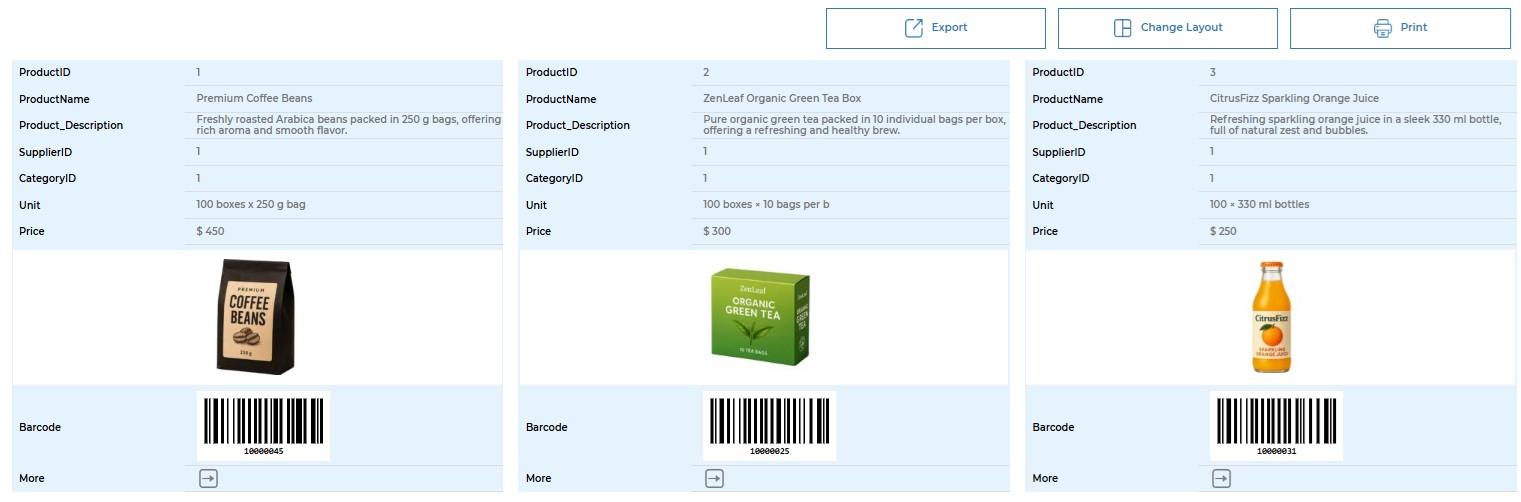
Images – Display image URLs as actual thumbnails (e.g., product photos).
Checkboxes – Represent Boolean values (true/false) as checked or unchecked boxes.
Star Ratings – Show numeric ratings (e.g., 4/5) as visual star indicators.
Country Flags – Convert country codes into recognizable flag icons.
Clickable Links – Turn URLs or email addresses into interactive hyperlinks.
Barcodes – Generate and display barcodes directly from your data for tracking and inventory use cases.
QR Codes – Automatically convert values into QR codes for quick access, sharing, or scanning.
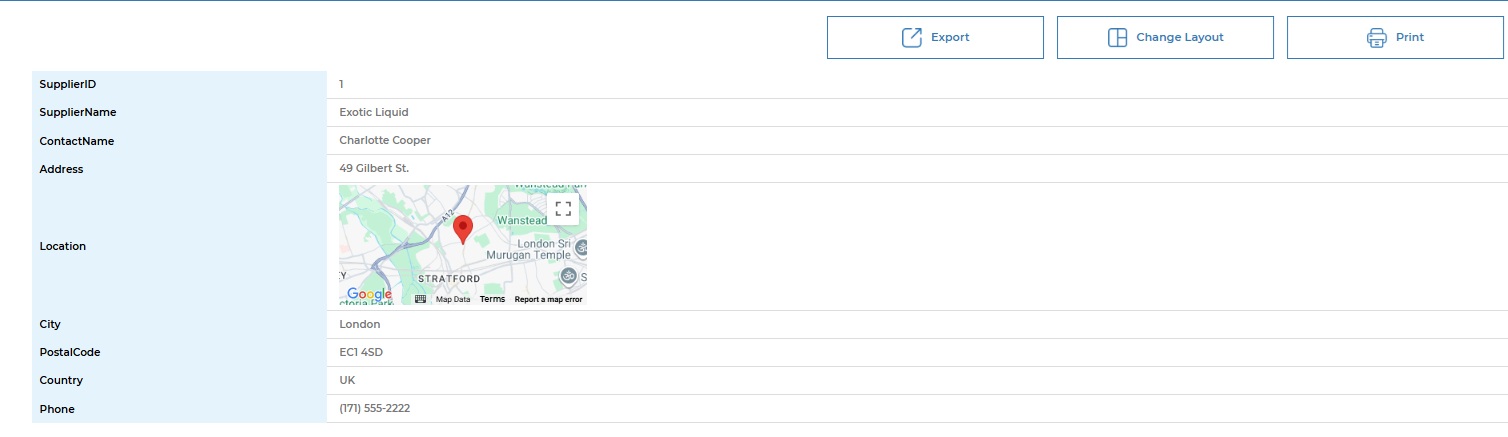
Google Maps – Visualize geographic data by displaying interactive Google Maps directly within report cells.
Financial Cells – Format numeric values as currencies, percentages, or accounting-style figures with proper symbols and alignment.
These dynamic formatting options make your reports more intuitive, visually engaging, and suitable for a wide range of business, analytical, and operational use cases.
Report Screenshot with Image and Barcode Cells
Report Screenshot with Google Map Cell
Conditional Formatting for Highlighting Key Data
Automatically apply formatting rules based on cell values to highlight critical insights and outliers. This feature helps draw immediate attention to data that requires action or review. For example, you can highlight the “Units in Stock” column in red when values fall below 10 to indicate low inventory. Likewise, you can display order statuses in green for “Completed” and orange for “Pending” to visually differentiate progress at a glance.
Comprehensive and User-Friendly Report Management
Smart Report Maker offers a powerful yet intuitive environment for creating, organizing, and securing reports. Its flexible features give you full control over how data is displayed, accessed, and shared:
Multi-Level Grouping Group your data by multiple levels (e.g., region > department) for structured and meaningful insights.
Flexible Sorting Options Sort data by one or more columns in ascending or descending order to surface key trends.
Define Columns and Rename Fields Select specific columns and apply aliases to rename fields for improved readability and clarity.
Duplicate Reports for Faster Creation Quickly duplicate any existing report to create a new one based on a similar structure, saving time and effort.
Reorder Report Fields Easily Rearrange selected fields effortlessly to control the order in which columns appear in the report.
Advanced Filtering, Grouping, and Sorting Customize your reports using powerful filters, grouping rules, and sorting logic to present data exactly as needed.
Quick Report Editing and Deletion Easily update or remove existing reports to keep your report library accurate and relevant.
Organize Reports into Categories Classify reports under categories or folders for better management and faster access.
Export to PDF, XML, or CSV Export a single page or the entire report in PDF, XML, or CSV format for sharing, analysis, or archiving.
Mobile-Friendly Reports Reports are optimized for smartphones and tablets, ensuring seamless access from any device.
Multilingual Support Create multilingual reports or add custom language support to serve a diverse user base.
Secure Report Access: Public and Private Options Control who can view each report by setting access levels.
Private Reports can be restricted to specific users or user groups.
Public Reports can be made accessible to all users. This ensures sensitive data is only visible to authorized personnel.
Frequently Asked Questions (FAQ)
Q: Why should I choose Smart Report Maker as my PHP reporting tool for MySQL or MariaDB?
A: Smart Report Maker is a powerful PHP reporting tool that has been on the market since 2007 and is trusted by thousands of users worldwide. It allows you to create reports, charts, pivot tables, KPIs, and PHP dashboards from any MySQL or MariaDB database without writing code.
The tool is easy to install using a web-based installer that runs directly from your browser, works smoothly on shared hosting, VPS, and dedicated servers, and runs entirely on your own server for full data privacy. Smart Report Maker is available with a one-time payment model—no subscriptions and no hidden fees—and generated reports and PHP dashboards can be easily and securely embedded into PHP applications and WordPress websites. For more details on why to choose Smart Report Maker, please click here
Q: Can Smart Report Maker be used by non-technical users without coding experience?
A: Yes, Smart Report Maker is designed for both technical and non-technical users. Its intuitive, wizard-based interface allows business users, analysts, and managers to build reports, PHP dashboards, charts, pivot tables, and KPIs without writing SQL or PHP code.
Additionally, unlike many similar tools that require command-line access or complex server configuration, Smart Report Maker uses a web-based installer that runs directly from your browser, making both installation and daily usage simple, fast, and accessible for everyone.
Q: What is the latest version of Smart Report Maker and what’s new in it?
Q: Can Smart Report Maker connect to multiple MySQL or MariaDB databases?
Yes. Smart Report Maker allows you to create and manage multiple connections to MySQL and MariaDB databases. This enables you to generate reports from different databases within the same system and streamline reporting across multiple data sources easily.